> ## Documentation Index
> Fetch the complete documentation index at: https://docs.gpuhub.com/llms.txt
> Use this file to discover all available pages before exploring further.
# Cursor
> Configure Cursor to call AI Gateway models with a custom OpenAI-compatible model provider.
 Cursor can call AI Gateway models through a custom OpenAI-compatible provider. Cursor Free may only support Auto mode; use Cursor Pro or a higher plan if custom model providers are required.
Cursor may fuzzy-match custom model names against built-in model names. If a custom model name overlaps with a built-in model name, Cursor may route the request to its own provider instead of AI Gateway.
## Configure a Custom Model
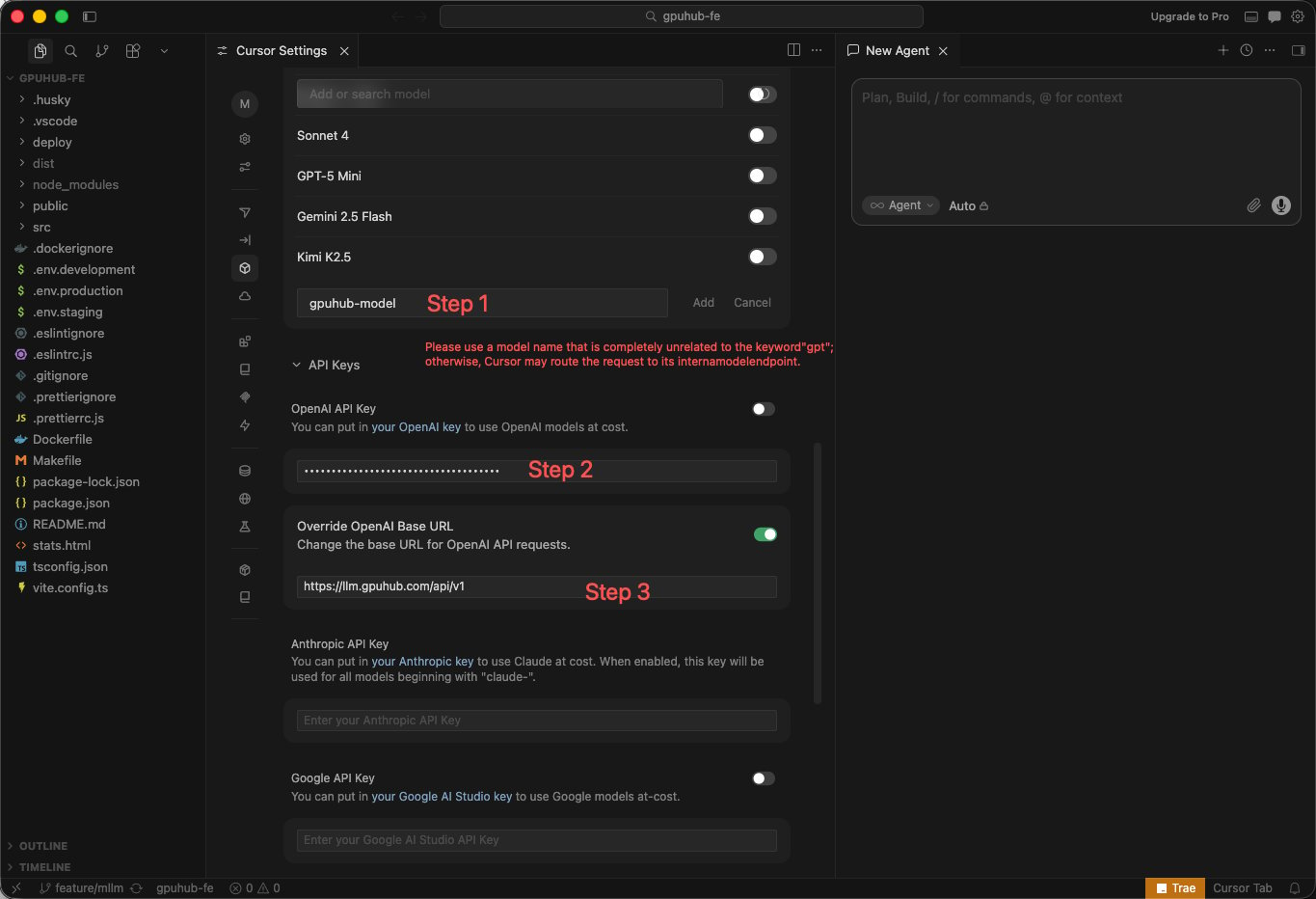
Use the following values when adding a custom provider or model in Cursor.
| Field | Value |
| ---------- | ------------------------------------- |
| API Key | Your AI Gateway API key |
| Base URL | `https://llm.gpuhub.com/api/v1` |
| Model name | A custom alias such as `gpuhub-model` |
Cursor can call AI Gateway models through a custom OpenAI-compatible provider. Cursor Free may only support Auto mode; use Cursor Pro or a higher plan if custom model providers are required.
Cursor may fuzzy-match custom model names against built-in model names. If a custom model name overlaps with a built-in model name, Cursor may route the request to its own provider instead of AI Gateway.
## Configure a Custom Model
Use the following values when adding a custom provider or model in Cursor.
| Field | Value |
| ---------- | ------------------------------------- |
| API Key | Your AI Gateway API key |
| Base URL | `https://llm.gpuhub.com/api/v1` |
| Model name | A custom alias such as `gpuhub-model` |
 ## Avoid Built-In Model Name Matching
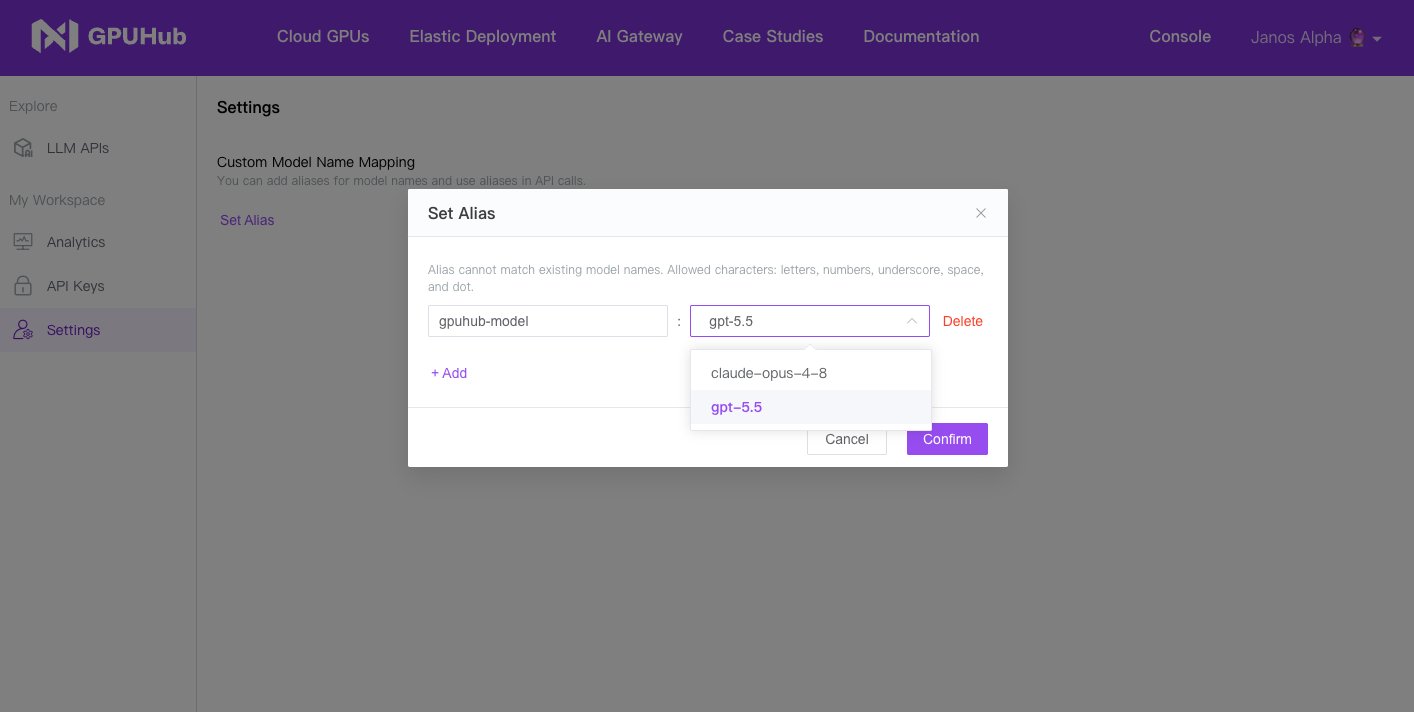
If you want to use a model such as `gpt-5.4`, avoid naming the Cursor custom model `gpt-5.4` directly. Use an unrelated alias such as `gpuhub-model`, then map that alias to the target model in the AI Gateway model settings.
## Avoid Built-In Model Name Matching
If you want to use a model such as `gpt-5.4`, avoid naming the Cursor custom model `gpt-5.4` directly. Use an unrelated alias such as `gpuhub-model`, then map that alias to the target model in the AI Gateway model settings.
 ## Recommended Flow
1. Create a custom model alias in Cursor, such as `gpuhub-model`.
2. Set the Base URL to `https://llm.gpuhub.com/api/v1`.
3. Enter your API key.
4. Map `gpuhub-model` to the target AI Gateway model in the console.
5. Select `gpuhub-model` in Cursor when starting a chat or coding task.
## Recommended Flow
1. Create a custom model alias in Cursor, such as `gpuhub-model`.
2. Set the Base URL to `https://llm.gpuhub.com/api/v1`.
3. Enter your API key.
4. Map `gpuhub-model` to the target AI Gateway model in the console.
5. Select `gpuhub-model` in Cursor when starting a chat or coding task.