> ## Documentation Index
> Fetch the complete documentation index at: https://docs.gpuhub.com/llms.txt
> Use this file to discover all available pages before exploring further.
# Cost-Saving Tips
> Tips for saving money on GPUhub by using no-GPU mode, adjusting GPU configurations, and automating shutdown etc.
## Scenario 1
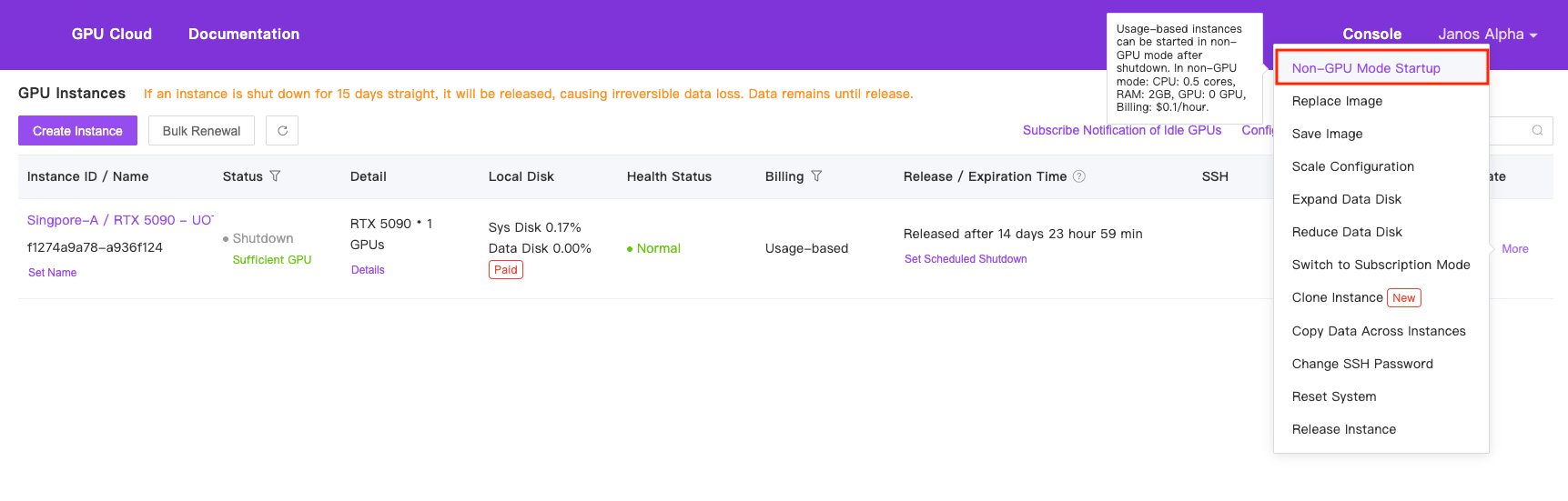
For tasks that don't require a GPU, such as coding, debugging, or data transfer, you can shut down and restart in "no-GPU mode." This mode uses 0.5 CPU cores, 2GB memory, and no GPU, costing \$0.1/hour. Data remains unaffected, and you can switch back to normal mode later.
No-GPU mode releases the GPU and sets it to an idle state. If the GPU is rented by other users during normal startup, there may be insufficient idle GPUs available.
 ## Scenario 2
Start with one GPU for debugging and validation, then scale up to multiple GPUs for parallel training to save costs. Refer to [Scale Configuration](/container-instance/scale-configuration) for details.
## Scenario 3
If you're unsure how long your code will run and want to shut down the machine immediately after completion, you can use the `shutdown` command (preferably with the full path: `/usr/bin/shutdown`).
Save your program's logs, as they will no longer be visible after automatic shutdown.
Example Commands:
```bash bash theme={null}
# If your original command is:
python train.py
# You can append the shutdown command:
python train.py; /usr/bin/shutdown # Using `;` ensures shutdown runs regardless of the previous command’s success.
python train.py && /usr/bin/shutdown # Using `&&` ensures shutdown runs only if the previous command succeeds. Choose based on your needs.
```
Alternatively, you can call `shutdown` from within your Python code:
```python python theme={null}
import os
if __name__ == "__main__":
# Your code here
os.system("/usr/bin/shutdown")
```
## Scenario 2
Start with one GPU for debugging and validation, then scale up to multiple GPUs for parallel training to save costs. Refer to [Scale Configuration](/container-instance/scale-configuration) for details.
## Scenario 3
If you're unsure how long your code will run and want to shut down the machine immediately after completion, you can use the `shutdown` command (preferably with the full path: `/usr/bin/shutdown`).
Save your program's logs, as they will no longer be visible after automatic shutdown.
Example Commands:
```bash bash theme={null}
# If your original command is:
python train.py
# You can append the shutdown command:
python train.py; /usr/bin/shutdown # Using `;` ensures shutdown runs regardless of the previous command’s success.
python train.py && /usr/bin/shutdown # Using `&&` ensures shutdown runs only if the previous command succeeds. Choose based on your needs.
```
Alternatively, you can call `shutdown` from within your Python code:
```python python theme={null}
import os
if __name__ == "__main__":
# Your code here
os.system("/usr/bin/shutdown")
```