

nvidia-smi command to check the GPU usage.
The red boxes marked below indicate the GPU memory usage and GPU utilization rate, respectively.
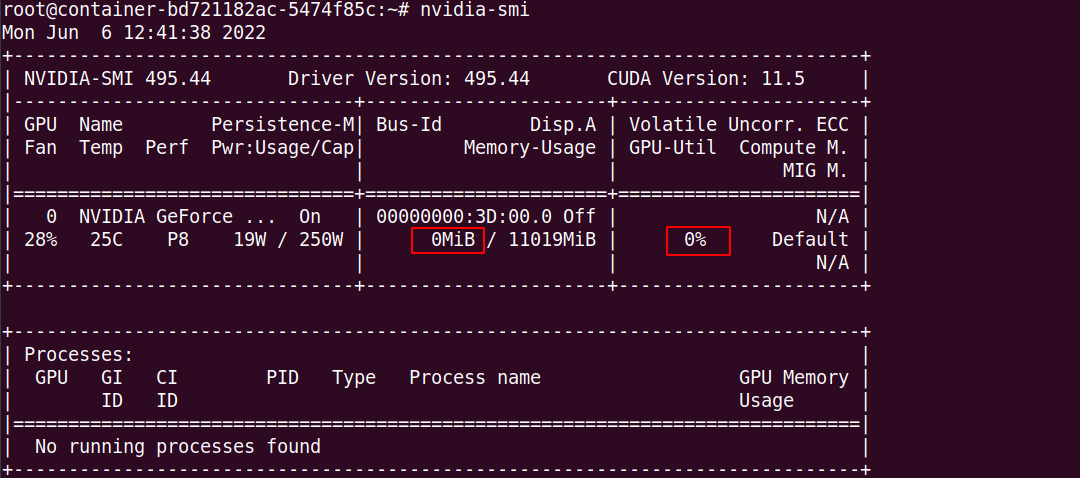
-
No GPU memory usage
This may indicate that the installed framework is a non-GPU version. Check as follows:
-
If you are using PyTorch:
If the version number contains “cu” (e.g., cu113, cu111), it indicates a CUDA version; otherwise, it is a CPU version.python
-
If you are using TensorFlow:
If CUDA version information is displayed, it indicates a GPU version; otherwise, it may be a CPU version.python
-
If you are using PyTorch:
- GPU memory is used, GPU utilization is non-zero but fluctuates significantly This indicates that the program is using the GPU, but the utilization is unstable. You can optimize the code to improve GPU utilization. Refer to relevant documentation for guidance.
-
GPU memory is used, but GPU utilization remains at 0
This situation can be divided into two cases:
- If using Ampere architecture GPUs (e.g., 30-series cards, A40, A100, A5000), CUDA 11.x is required.
- If the code is not calling the GPU for computation, the framework may still allocate GPU memory when importing the framework and building the network. This results in GPU memory usage without actual GPU computation. You can verify this with the following code:
If the GPU utilization is non-zero after running the above code, it indicates that your code may not be calling the GPU for computation. Check and debug your code. If the code execution fails, contact customer support for assistance.bash